Tag: Incident Response

  • Drupal CVE-2026-136716: Patch the Installer Access Bypass (SA-CORE-2026-019)

    Drupal CVE-2026-136716: Patch the Installer Access Bypass (SA-CORE-2026-019)

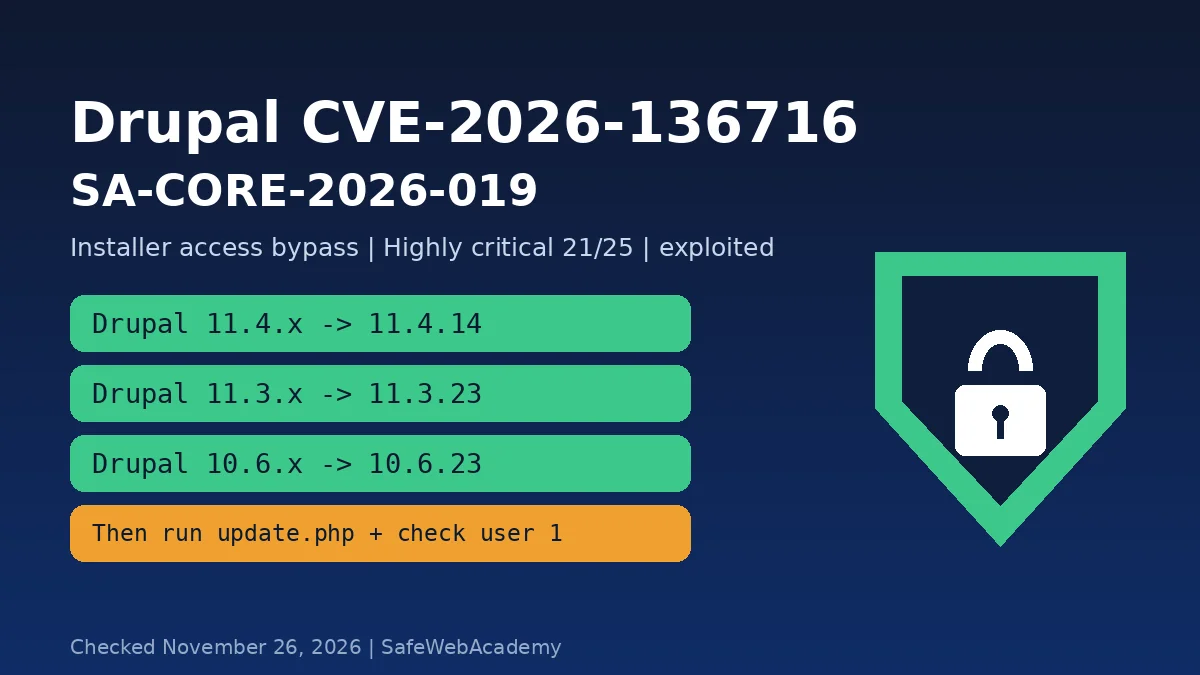
    Drupal CVE-2026-136716 graphic: SA-CORE-2026-019 installer access bypass fixed in Drupal 11.4.14, 11.3.23 and 10.6.23

    Introduction

    Drupal CVE-2026-136716 is a highly critical access bypass in Drupal core’s installer, and the Drupal Security Team says it is being exploited in the wild. On November 25, 2026, Drupal published advisory SA-CORE-2026-019 and released Drupal 11.4.14, 11.3.23 and 10.6.23 to fix it.

    The flaw is a follow-up to last week’s installer fix: some sites in “unusual or incomplete install states” were still open to takeover after the November 18 releases. If you patched to 11.4.13, 11.3.22 or 10.6.22, update again, run update.php and check your administrator account. This guide explains who is affected and what to do, without exploit details.

    Key Facts: Drupal CVE-2026-136716 at a Glance

    • What: access bypass in Drupal core related to the installer (install.php), advisory SA-CORE-2026-019, published November 25, 2026 at 17:04 UTC (19:04 Kyiv time).
    • CVE: CVE-2026-136716 (CWE-754), record published November 26, 2026. NVD has no CVSS score yet.
    • Severity: “Highly critical”, 21/25 on Drupal’s risk scale (AC:Basic/A:None/CI:All/II:All/E:Exploit/TD:Uncommon).
    • Affected: Drupal core before 10.6.23, 11.0.0 to before 11.3.23, and 11.4.0 to before 11.4.14.
    • Fixed in: 11.4.14, 11.3.23 and 10.6.23 (November 25, 2026), plus a required update hook.
    • Exploitation: the Drupal Security Team says the flaw “is being exploited in the wild”. It was not in the CISA KEV catalog as of version 2026.11.25. The earlier installer flaw, CVE-2026-132165, has been in KEV since November 24, 2026.

    What Is Drupal CVE-2026-136716?

    Drupal CVE-2026-136716 is a gap left after the SA-CORE-2026-017 installer fix: sites in certain unusual or incomplete install states could still be taken over.

    Drupal core ships with core/install.php, which you only need once, to install a site. SA-CORE-2026-017 fixed several installer vulnerabilities on November 18. SA-CORE-2026-019 says certain sites “remain vulnerable to site takeover following that advisory, including production sites.”

    Drupal adds that the vulnerable state is “not apparent in the user interface”, and that already compromised sites may no longer be in it. A clean check today does not prove a site was never attacked.

    How is it different from CVE-2026-132165?

    CVE-2026-132165 is the installer remote code execution flaw fixed on November 18 in 10.6.22, 11.3.22 and 11.4.13. CVE-2026-136716 covers the remaining access bypass, and only the November 25 releases fix both. See our guide to the Drupal installer RCE CVE-2026-132165.

    Which Drupal Versions Are Affected?

    Every supported Drupal 10 and 11 branch below the November 25 releases is affected, and end-of-life branches get no fix.

    Drupal branchAffectedFixed inSecurity coverage
    11.4.x11.4.0 to 11.4.1311.4.14Until April 2027
    11.3.x11.3.0 to 11.3.2211.3.23Until Drupal 11.5.0 (December 2026)
    11.0.x to 11.2.xAllNo fixEnd-of-life
    10.6.xBefore 10.6.2310.6.23Until Drupal 11.5.0 (December 2026)
    10.5.x and older, Drupal 8 and 9AllNo fixEnd-of-life

    Drupal’s release history lists all three fixed releases as published on November 25, 2026, between 16:57 and 17:49 UTC.

    What Is the Security Impact?

    The worst case is a full site takeover by an attacker who does not need to log in.

    The risk string says no authentication is needed (A:None), all non-public data can be read (CI:All) and all data can be changed or deleted (II:All). Exploit code exists in the wild (E:Exploit). The target distribution is “uncommon”, because only sites in specific install states are exposed.

    According to the advisory, sites and platforms that use Drupal Steward’s recommended mitigations are already protected from known attack vectors. Drupal still asks them to upgrade soon.

    How Do I Check Whether My Site Is Affected?

    Check the core version, test the installer, then look for signs of compromise.

    How do I check my Drupal version?

    Open Reports > Status report (/admin/reports/status), or run these commands in your project directory:

    composer show drupal/core | grep versions
    drush status --field=drupal-version

    Anything below 11.4.14, 11.3.23 or 10.6.23 needs the update.

    Is my installer reachable from the internet?

    Drupal’s guide to securing the installer gives three test requests. Replace example.com with your domain:

    curl -I https://example.com/core/install.php
    curl -IL https://example.com/install.php
    curl -I https://example.com/core/install.php/foo

    All three should end with 403 or 404. A 200 means the installer is reachable.

    How do I check for signs of compromise?

    Drupal warns that any site that left its installer reachable after SA-CORE-2026-017 may have been compromised. It asks you to check:

    • Logs: look for unauthorized access, especially unexpected changes to or by user 1 (the first administrator account).
    • User 1 email: make sure it is an address you control. Drush can show it with drush user:information --uid=1.
    • User 1 password: consider resetting it.

    If anything looks wrong, follow Drupal’s guide “Your Drupal site got hacked. Now what?”.

    How Do I Fix Drupal CVE-2026-136716?

    Update core to the fixed release for your branch, run the database update, then secure the installer permanently.
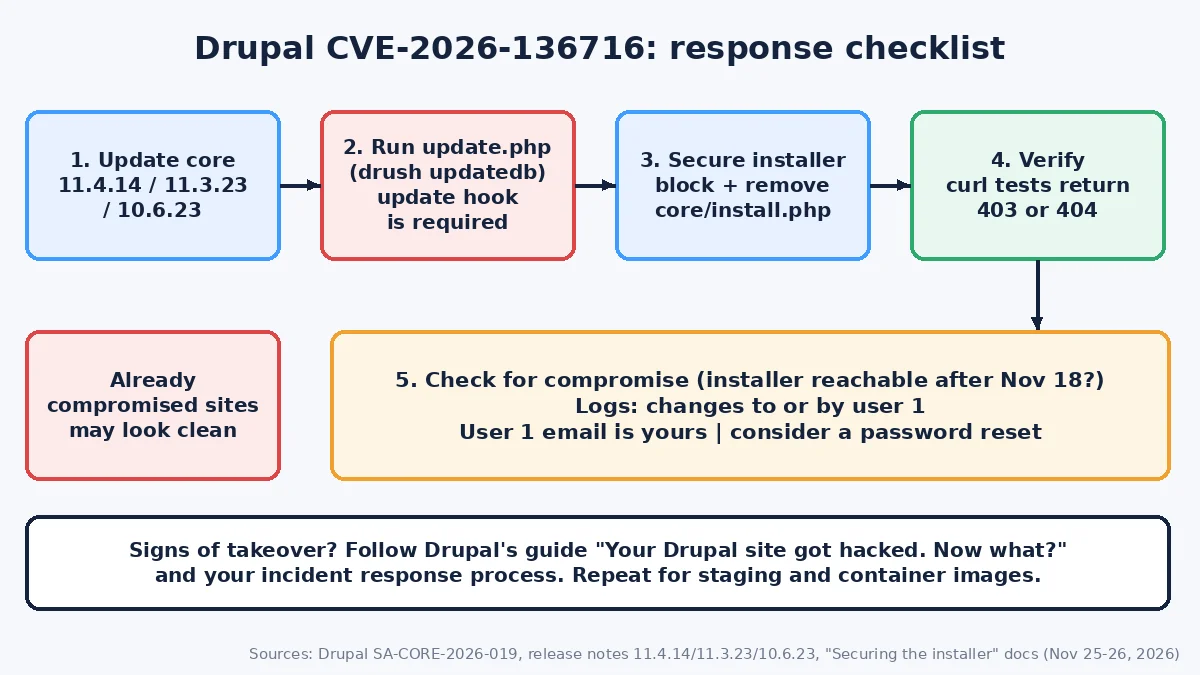
    Drupal CVE-2026-136716 response checklist: update core, run update.php, secure install.php, verify 403 or 404, check user 1
    Fixing Drupal CVE-2026-136716 takes more than a code update: the update hook and the user 1 checks matter too.
    1. Back up the database and files.
    2. Update core with Composer. For sites based on drupal/core-recommended, Drupal’s update guide uses composer update "drupal/core-*" --with-all-dependencies. The release notes say a same-day Symfony security update is not included, so update Symfony separately where your constraints allow.
    3. Run update.php or drush updatedb. Drupal says an update hook must run to fix existing production sites in the vulnerable state, so do not skip this step.
    4. Rebuild caches with drush cache:rebuild and confirm the new version in the Status report.
    5. Secure the installer (next section) and rerun the curl tests.
    6. Check user 1 and your logs as described above.
    7. Repeat for every copy, including staging and container images.

    How do I secure install.php for good?

    Drupal’s documentation, updated on November 25, 2026, recommends blocking the installer in the web server and removing the file. For Nginx, add this inside the HTTPS server block and run nginx -t before reloading:

    location ^~ /core/install.php {
      return 404;
    }

    For Apache, put a <Location "/core/install.php"> block with Require all denied in the virtual host, not in .htaccess. Do not block update.php by mistake. Drupal advises removing the file as well, so one layer still works if the other lapses. The releases also fix the “Theme hook field not found” regression from November 18.

    Additional Security Recommendations

    These habits limit the damage from the next installer flaw:

    • Never leave a half-finished install online. Drupal’s guide says to finish installation before a server is reachable from the internet. drush site:install does not use install.php.
    • Protect settings.php. Let a deployment account own the code and settings, not the PHP process.
    • Alert on admin account changes to user 1’s email or password.
    • Use a WAF as an extra layer. A web application firewall can filter known attack paths, but it does not replace patching.
    • Have a response plan. If you find signs of takeover, follow an incident response process for data breaches.

    FAQ

    Is Drupal CVE-2026-136716 being exploited?

    Yes, according to Drupal. SA-CORE-2026-019 says “this is being exploited in the wild.” As of November 26, 2026, CISA had not added CVE-2026-136716 to its KEV catalog (version 2026.11.25), but KEV already lists the related CVE-2026-132165.

    I updated to 11.4.13 last week. Do I need to update again?

    Yes. 11.4.13, 11.3.22 and 10.6.22 fix SA-CORE-2026-017 but are affected by CVE-2026-136716. Install 11.4.14, 11.3.23 or 10.6.23 and run update.php.

    If my installer is already blocked, am I safe?

    The advisory says sites that have already secured the installer are not vulnerable. Update anyway, run the database update and check user 1, especially if the installer was reachable at any time after November 18.

    Is Drupal 7 affected?

    The advisory covers Drupal 10 and 11 and does not mention Drupal 7, so ask your Drupal 7 extended support vendor.

    Conclusion

    Drupal CVE-2026-136716 is being exploited, and last week’s releases do not fix it. Update to 11.4.14, 11.3.23 or 10.6.23, run update.php, block and remove install.php, and check the user 1 account on every Drupal site you manage.

    References

    Related Articles

    Last Verified: November 26, 2026. Prepared by SafeWebAcademy from the official Drupal security advisories, release notes and documentation, the CVE.org and NVD records, and the CISA KEV catalog linked above. This is not an official Drupal Association publication. Security details can change, so check the linked advisories for updates.
  • How Organizations Can Handle Data Breaches

    How Organizations Can Handle Data Breaches

    Data breach response team reviewing exposed systems

    Understanding Data Breaches

    A data breach occurs when sensitive, confidential, or protected information is accessed, disclosed, or stolen by unauthorized individuals. These incidents can have severe consequences, including financial losses, reputational damage, and legal repercussions.

    Data Breach Definition (data breach def): A data breach is the unauthorized access or exposure of sensitive data, often resulting from cyberattacks, human error, or system vulnerabilities.


    Examples of Notable Data Breaches

    1. Equifax Data Breach (2017)
    The Equifax data breach is one of the most infamous cybersecurity incidents in history. Hackers exploited a vulnerability in the company’s web application framework (Apache Struts) to gain access to sensitive data. Over 147 million individuals were affected, with stolen information including Social Security numbers, birth dates, addresses, and even driver’s license numbers.
    Impact: The breach led to a $700 million settlement with the Federal Trade Commission (FTC), including compensation for affected individuals and fines for failing to protect consumer data.
    Lesson Learned: Regularly updating software and patching vulnerabilities is critical to preventing breaches. Equifax failed to apply a known patch, which allowed hackers to exploit the system.

    2. T-Mobile Data Breach (2021)
    In 2021, T-Mobile suffered a massive breach where hackers accessed the personal data of over 40 million customers. The stolen data included names, Social Security numbers, driver’s license information, and account PINs. The breach was reportedly carried out by a hacker who exploited a misconfigured API.
    Impact: T-Mobile faced lawsuits and reputational damage, with customers questioning the company’s ability to secure their data. The breach also highlighted the risks associated with APIs and mobile network vulnerabilities.
    Lesson Learned: Organizations must secure APIs and conduct regular penetration testing to identify and fix vulnerabilities before attackers can exploit them.

    3. Bank of America Data Breach
    While not as widely publicized as other breaches, Bank of America has faced incidents where sensitive customer data was exposed. For example, in 2020, the bank accidentally leaked customer information during the Paycheck Protection Program (PPP) application process. Although this was not a cyberattack, it demonstrated the risks of human error in data handling.
    Impact: The breach caused concern among customers and highlighted the importance of secure data handling practices, even in non-cyberattack scenarios.
    Lesson Learned: Human error can be just as damaging as cyberattacks. Organizations must implement strict data handling protocols and train employees to minimize mistakes.

    4. Marriott International Data Breach (2018)
    Marriott International experienced a breach that exposed the personal data of approximately 500 million guests. The breach originated from the Starwood guest reservation database, which Marriott had acquired in 2016. Hackers had been accessing the system since 2014, long before Marriott’s acquisition.
    Impact: The stolen data included names, passport numbers, credit card details, and travel information. Marriott faced a $23.8 million fine under GDPR regulations and significant reputational damage.
    Lesson Learned: When acquiring another company, organizations must thoroughly assess the cybersecurity posture of the acquired entity. This breach also emphasized the importance of securing third-party systems.

    5. Yahoo Data Breach (2013-2014)
    Yahoo suffered a series of breaches that exposed the data of 3 billion user accounts, making it the largest data breach in history. The stolen data included names, email addresses, phone numbers, and hashed passwords. The breach was not disclosed until 2016, years after it occurred.
    Impact: Yahoo faced lawsuits, regulatory scrutiny, and a significant drop in its valuation during its acquisition by Verizon. The company’s delayed disclosure also damaged its reputation.
    Lesson Learned: Timely disclosure of breaches is critical to maintaining trust. Organizations must also invest in robust encryption and monitoring systems to detect breaches early.

    6. Target Data Breach (2013)
    Hackers gained access to Target’s network by compromising a third-party vendor’s credentials. They installed malware on the company’s point-of-sale (POS) systems, stealing the credit and debit card information of 40 million customers. Additionally, the personal information of 70 million customers was exposed.
    Impact: Target faced lawsuits, regulatory fines, and a loss of customer trust. The breach cost the company over $200 million in settlements and security upgrades.
    Lesson Learned: Vendor risk management is crucial. Organizations must ensure that third-party vendors adhere to strict cybersecurity standards.

    7. Capital One Data Breach (2019)
    A former employee of Amazon Web Services (AWS) exploited a misconfigured firewall to access Capital One’s cloud storage. The breach exposed the personal data of over 100 million customers, including Social Security numbers, bank account details, and credit scores.
    Impact: Capital One faced a $190 million settlement and regulatory fines. The breach also raised concerns about the security of cloud-based systems.
    Lesson Learned: Misconfigurations in cloud environments can lead to significant breaches. Organizations must implement robust cloud security practices and regularly audit their configurations.

    8. Facebook (Meta) Data Breach (2019)
    In 2019, Facebook experienced a breach where over 540 million user records were exposed on an unsecured server. The data included account names, IDs, and activity logs. The breach was caused by a third-party app developer’s negligence.
    Impact: Facebook faced criticism for its lack of oversight over third-party developers and their data handling practices. The incident further damaged the company’s reputation following the Cambridge Analytica scandal.
    Lesson Learned: Organizations must monitor third-party applications and enforce strict data-sharing policies to prevent unauthorized access.

    These examples highlight the diverse ways in which data breaches can occur, from exploiting software vulnerabilities to human error and third-party risks. By learning from these incidents, organizations can better prepare to prevent and respond to breaches.


    How Organizations React to Data Breaches

    When a data breach occurs, organizations must act swiftly to minimize damage and restore trust. Here’s how they typically respond:

    1. Immediate Containment: Organizations work to identify the source of the breach and contain it to prevent further data loss. This may involve shutting down affected systems, isolating compromised networks, or revoking access credentials.
    2. Investigation: A thorough investigation is conducted to determine the scope of the breach, the type of data affected, and the methods used by the attackers. Cybersecurity experts and forensic teams are often brought in to assist.
    3. Notification: Organizations are required by data breach laws to notify affected individuals and regulatory authorities within a specified timeframe. Transparency is key to maintaining trust.
    4. Remediation: Steps are taken to address vulnerabilities, such as patching software, updating security protocols, and implementing stronger access controls.
    5. Public Relations Management: Organizations often issue public statements to explain the breach, outline the steps being taken to address it, and reassure customers and stakeholders.
    6. Legal and Financial Actions: Companies may face lawsuits, regulatory fines, and compensation claims. Legal teams work to navigate these challenges while ensuring compliance with data breach laws.

    What to Do in Case a Data Breach Happens

    If your organization experiences a data breach, follow these steps to mitigate the impact:

    1. Activate Your Incident Response Plan: A well-prepared incident response plan is crucial for managing a breach effectively. Ensure all team members know their roles and responsibilities.
    2. Contain the Breach: Isolate affected systems to prevent further data loss. This may involve disconnecting from the internet, disabling compromised accounts, or shutting down servers.
    3. Assess the Damage: Determine the scope of the breach, including the type of data affected, the number of individuals impacted, and the potential risks.
    4. Notify Affected Parties: Inform customers, employees, and other stakeholders about the breach. Be transparent about what happened, what data was compromised, and what steps are being taken to address the issue.
    5. Cooperate with Authorities: Report the breach to regulatory authorities as required by data breach laws. Work with law enforcement and cybersecurity experts to investigate the incident.
    6. Provide Support to Victims: Offer resources to help affected individuals protect themselves, such as credit monitoring services, identity theft protection, or guidance on securing their accounts.
    7. Review and Improve Security Measures: Conduct a post-incident review to identify weaknesses in your security protocols and implement improvements to prevent future breaches.

    How to Prevent Data Breaches (data breach prevention)

    Organizations can take proactive steps to minimize the risk of data breaches:

    1. Implement Strong Access Controls: Limit access to sensitive data to only those employees who need it for their roles. Use multi-factor authentication (MFA) to add an extra layer of security.
    2. Regular Security Audits: Conduct frequent audits to identify vulnerabilities in your systems and address them promptly.
    3. Employee Training: Educate employees about cybersecurity best practices, such as recognizing phishing attempts and using strong passwords.
    4. Data Encryption: Encrypt sensitive data both in transit and at rest to ensure that even if it is intercepted, it cannot be easily accessed.
    5. Compliance with Data Breach Laws: Stay updated on the latest data breach laws and regulations, such as GDPR, CCPA, and HIPAA, to ensure compliance and avoid hefty fines.
    6. Incident Response Plan: Develop and regularly update an incident response plan to quickly address breaches when they occur. This includes notifying affected parties, working with cybersecurity experts, and cooperating with regulatory authorities.

    The Costs of a Data Breach

    Data breaches can be incredibly costly for organizations. According to recent studies, the average cost of a data breach in 2023 was $4.45 million globally. These costs include legal fees, regulatory fines, customer compensation, and the expense of implementing new security measures.


    Staying Ahead of the Latest Threats

    To protect against the latest data breaches (data breach latest), organizations must stay informed about emerging threats and invest in advanced cybersecurity technologies, such as AI-driven threat detection and zero-trust architecture.


    By learning from past incidents like the Equifax, T-Mobile, and Marriott breaches, and by implementing robust data breach prevention strategies, organizations can significantly reduce their risk and protect their sensitive information.

    Related reading