Introduction
WordPress 7.1.5, released on November 18, 2026, is a security release that fixes 20 issues in WordPress core. The most serious is an unauthenticated privilege escalation through Template Part block attributes that could lead to remote code execution. The WordPress project recommends updating immediately, and it backported the fixes to every branch back to 4.7. CVE IDs are still pending, so this article tracks the official GitHub advisory (GHSA) IDs.
This article summarizes the official release post, the HelpHub page and the WordPress security advisories. It explains which versions are affected and how to check and update your site. It contains no exploit details.
Key Facts: WordPress 7.1.5 at a Glance
- What: WordPress 7.1.5 (November 18, 2026) fixes 20 security issues, including two SQL injections, several cross-site scripting (XSS) flaws and two privilege escalations.
- Most serious: GHSA-pmp8-6cv8-q323, an unauthenticated privilege escalation via Template Part block attributes that could lead to remote code execution. WordPress rates it “high.”
- Affected: all WordPress versions before 7.1.5, depending on the issue. Fixed backport releases exist for every branch from 7.0 down to 4.7.
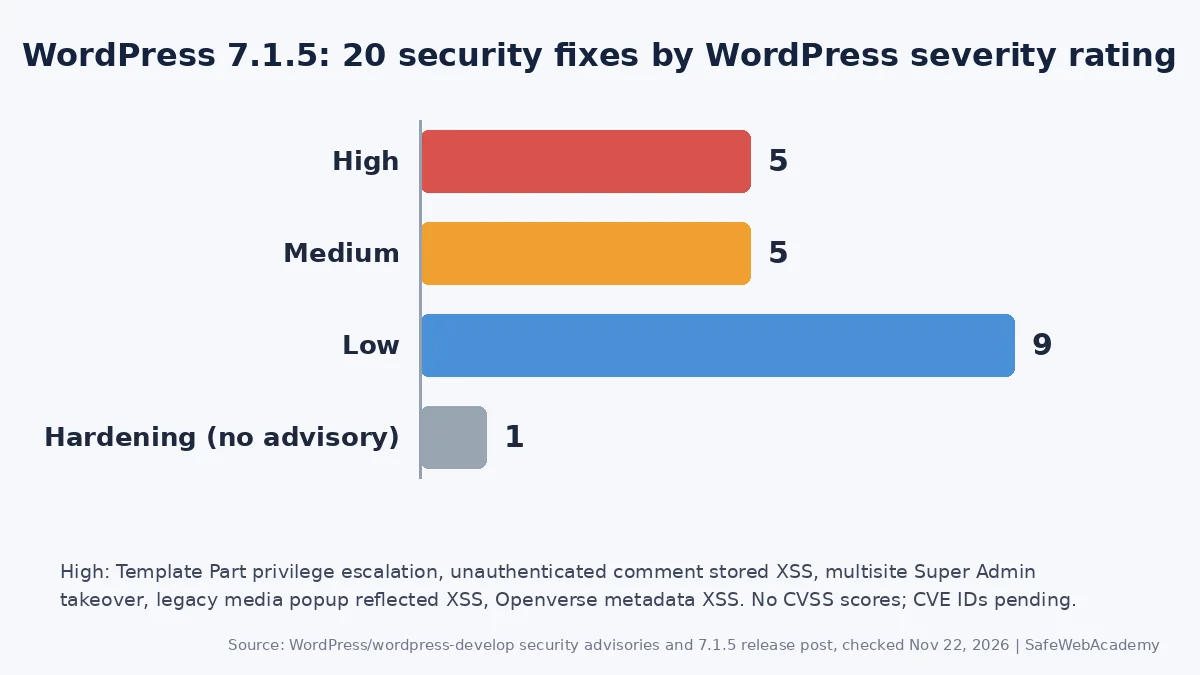
- Severity: 19 GitHub security advisories from the WordPress project: 5 high, 5 medium, 9 low. No CVSS scores were published.
- CVE IDs: pending. None were assigned or published as of November 22, 2026. The advisories use GHSA IDs only.
- Exploitation: none reported by WordPress, and no WordPress 7.1.5 issue appears in the CISA KEV catalog (version 2026.11.20, still the latest on November 22, 2026).
- Action: update to 7.1.5, or to the latest release of your branch (for example 7.0.9 or 6.9.12).
What Does WordPress 7.1.5 Fix?
WordPress 7.1.5 fixes 20 security issues, ranging from an unauthenticated privilege escalation to low-risk hardening changes.
The WordPress project published 19 of them as security advisories in the WordPress/wordpress-develop GitHub repository. The 20th, the removal of the block editor’s Imgur embed variation, is a hardening change without its own advisory.
| Advisory | Issue | WordPress rating |
|---|---|---|
| GHSA-pmp8-6cv8-q323 | Unauthenticated privilege escalation via Template Part block attributes, possible RCE | High |
| GHSA-cr2m-2j4r-3v3x | Unauthenticated stored XSS via shortcode attributes in comments | High |
| GHSA-mwj7-xhp9-7773 | Multisite: site Administrator can take over a Super Admin account via Customizer menu previews | High |
| GHSA-gm52-6h3w-97v4 | Reflected XSS in the legacy media library popup | High |
| GHSA-jmhp-hg7w-w9c5 | XSS in the block editor via Openverse image metadata | High |
| GHSA-xc9c-4hg4-h4jg | SQL injection in WP_Meta_Query via nested relation values | Medium |
| GHSA-mcv9-c2pg-6m4v | SQL injection via the front page setting in Customizer changeset previews | Medium |
| GHSA-56j2-5mp6-wr3x | Unauthenticated denial of service via batched XML-RPC pingbacks | Medium |
| GHSA-rcr3-43fx-wqfv | Unauthenticated disclosure of private taxonomy terms via the REST API search endpoint | Medium |
| GHSA-p9x8-m3q4-9wg6 | Subscriber+ information disclosure via XML-RPC wp.getComments | Medium |
Nine more advisories are rated low. They cover Contributor+ and Administrator XSS issues, Author+ and Editor+ information disclosure, an Author+ authorization bypass in comment editing, and a regular expression hardening fix.
What Is the Security Impact?
The biggest risk is the Template Part privilege escalation, because it can end with an attacker holding an Administrator account.
How serious is the Template Part privilege escalation?
The advisory explains that a Template Part block’s theme and slug attributes could make an Administrator’s editor send requests to another URL on the same site. An Author or higher could set these attributes in a post. An unauthenticated attacker could also send an Administrator a crafted editor link. When the Administrator opened it, this could create an Administrator account for the attacker. That account allows code execution through plugin upload.
So the attack needs an Administrator to open a page in the editor. That is a realistic step, because attackers can hide such links in emails or redirects. The fix was backported to all branches back to 5.9.
Which other issues matter most?
The unauthenticated stored XSS in comments matters for any site with open comments. The two SQL injections and the multisite Super Admin takeover matter for sites with many users. The XML-RPC pingback denial of service matters if xmlrpc.php is reachable.
Which WordPress Versions Are Affected?
Every branch from 4.7 to 7.1 is affected by some of the 20 issues, and each one has a fixed release.
| Branch | Fixed release | Issues that affect the branch |
|---|---|---|
| 7.1 | 7.1.5 | All 20 |
| 7.0 | 7.0.9 | All 20 |
| 6.5 to 6.9 | 6.5.15, 6.6.12, 6.7.12, 6.8.13, 6.9.12 | All 20 |
| 6.2 to 6.4 | 6.2.16, 6.3.15, 6.4.15 | 19 of 20 |
| 6.0 and 6.1 | 6.0.19, 6.1.17 | 18 of 20 |
| 5.9 | 5.9.21 | 17 of 20 |
| 5.6 to 5.8 | 5.6.24, 5.7.22, 5.8.20 | 15 of 20 |
| 5.1 to 5.5 | 5.1.29, 5.2.31, 5.3.28, 5.4.26, 5.5.25 | 13 of 20 |
| 4.8, 4.9, 5.0 | 4.8.35, 4.9.36, 5.0.32 | 12 of 20 |
| 4.7 | 4.7.40 | 11 of 20 |
| 4.6 and older | No fix | Not supported |
The counts come from the WordPress 7.1.5 HelpHub page. WordPress also says only the most recent version is actively supported, so backports are a courtesy. The same releases remove 1024-bit certificates from the bundled root certificates on 6.9.12 and older. WordPress 7.2 RC 2 includes the fixes as well.
How Do I Check Whether My Site Needs WordPress 7.1.5?
Check your exact WordPress version and compare it with the fixed release for your branch.
How do I check my WordPress version?
In the admin area, go to Dashboard > Updates. With WP-CLI or shell access, run:
wp core version
grep "wp_version =" wp-includes/version.php
If the result is lower than the fixed release in the table above, your site is affected.
Are automatic updates already protecting me?
Possibly. WordPress documentation says existing installations receive minor core updates automatically by default. Check that wp-config.php does not set AUTOMATIC_UPDATER_DISABLED to true or WP_AUTO_UPDATE_CORE to false. Then confirm the version anyway, because hosts and version control setups can block updates.
How Do I Update to WordPress 7.1.5?
Update WordPress core from the dashboard or WP-CLI, then confirm the new version.
- Back up first. Follow our guide on how to back up WordPress.
- Update core. Click Update Now under Dashboard > Updates, or run
wp core update. - Stay on an old branch only if you must. Run
wp core update --minorto get the latest release of your current branch, such as 6.9.12. - Verify the files. Run
wp core verify-checksumsto compare core files with the official release. - Update every site. Include staging copies, multisite networks and container images.
WordPress did not publish a workaround, so updating is the fix.
Additional Security Recommendations
WordPress 7.1.5 closes these core flaws, but these steps limit the damage from the next one:
- Review admin accounts. Remove any Administrator you do not recognize, and use two-factor authentication for every admin.
- Be careful with editor links. Administrators should not open unexpected editor links from emails or chats.
- Patch the server stack. Apply the PHP security update and the Apache HTTP Server 2.4.71 or nginx 1.30.7 and 1.31.9 updates.
- Add a WAF layer. A web application firewall can filter attacks, but it does not replace patching.
- Update plugins too. An NVD keyword search returned about 200 WordPress-related CVE records published between November 19 and 22, 2026, nearly all for plugins or themes. Keep plugins and themes current.
FAQ
Is WordPress 7.1.5 a security release?
Yes. WordPress calls it a security release and recommends updating immediately. The release post lists 20 security fixes and nothing else for 7.1.5.
Do the WordPress 7.1.5 vulnerabilities have CVE IDs?
Not yet; CVE IDs are pending. As of November 22, 2026, the release post, HelpHub page and all 19 GitHub advisories list no CVE IDs, and NVD shows no matching records. Use the GHSA IDs to track them. We will update this article when CVE IDs appear.
Is anyone exploiting these WordPress flaws?
WordPress has not reported exploitation, and none of these issues is in the CISA KEV catalog (version 2026.11.20). Public exploit code availability is unknown.
I run WordPress 6.9. Do I have to move to 7.1?
No. WordPress 6.9.12 contains fixes for all 20 issues. However, only the latest version is actively supported, so plan the upgrade.
Conclusion
WordPress 7.1.5 fixes 20 core security issues, led by a Template Part privilege escalation that can end in code execution. Check your version, install WordPress 7.1.5 or your branch’s backport, and confirm automatic updates are working.
References
All links below were checked on November 22, 2026.
- WordPress 7.1.5 Release (WordPress News)
- WordPress 7.1.5 HelpHub page
- WordPress security advisories on GitHub (wordpress-develop)
- GHSA-pmp8-6cv8-q323: Template Part privilege escalation
- WordPress docs: Upgrading WordPress and automatic background updates
- WP-CLI: wp core update
- CISA Known Exploited Vulnerabilities catalog
Related Articles
- How to back up WordPress
- PHP 8.5.13, 8.4.28, 8.3.37 and 8.2.36 Security Update: What to Patch Now
- Apache HTTP Server 2.4.71: Patch mod_http2 CVE-2026-119618
- Drupal Security Update: Patch the Installer RCE (CVE-2026-132165) Now
- OWASP Top 10 Explained: A Practical Guide to Website Security
- Why two Factor Authentication Is Important
Last Verified: November 22, 2026. Prepared by SafeWebAcademy from the official WordPress release post, HelpHub page and WordPress security advisories linked above. This is not an official WordPress.org publication. Security details can change, so check the linked advisories for updates.