Introduction
HTTP security headers are response headers that tell the browser how to treat your pages. They are cheap to add and they limit the damage of bugs such as cross-site scripting (XSS), clickjacking and downgrade attacks. This guide lists the HTTP security headers worth setting as of November 23, 2026, gives copy-ready nginx and Apache examples, and shows how to roll out the risky ones (HSTS and CSP) safely. It follows the OWASP HTTP Headers Cheat Sheet and MDN documentation. No header replaces patching, so keep your software updated too.
Key Facts: HTTP Security Headers at a Glance
- Set on every HTML response:
Strict-Transport-Security,Content-Security-Policy,X-Content-Type-Options,Referrer-Policy,Permissions-Policy. - Framing: use CSP
frame-ancestors. OWASP says it obsoletesX-Frame-Options;X-Frame-Options: DENYis the fallback. - Do not rely on:
X-XSS-Protection(OWASP: set0or omit),Expect-CTandPublic-Key-Pins(HPKP; OWASP: do not use). - Riskiest to deploy: HSTS (mistakes lock users out) and CSP (can break scripts). Roll both out in stages.
- Nginx gotcha:
add_headeris inherited only if the current level defines noadd_headerof its own. - Test with:
curl -I, browser DevTools and the Mozilla Observatory.
Which HTTP Security Headers Should You Set?
Set the headers below on pages that browsers render. The values come from the OWASP HTTP Headers Cheat Sheet.
| Header | Recommended value (OWASP) | What it does |
|---|---|---|
| Strict-Transport-Security | max-age=63072000; includeSubDomains; preload | Makes browsers use HTTPS only |
| Content-Security-Policy | See the CSP section below | Limits where scripts and other content load from |
| X-Content-Type-Options | nosniff | Stops MIME type sniffing |
| Referrer-Policy | strict-origin-when-cross-origin | Limits referrer data sent to other sites |
| Permissions-Policy | geolocation=(), camera=(), microphone=() | Disables browser features you do not use |
| Cross-Origin-Opener-Policy | same-origin | Isolates your page from cross-origin windows |
| Cross-Origin-Resource-Policy | same-site | Limits which origins can load your resources |
| X-Frame-Options | DENY | Blocks framing (legacy; prefer CSP frame-ancestors) |
OWASP notes that CSP, COOP and similar headers matter for pages browsers render, and may be meaningless on a JSON API. Adjust the Permissions-Policy list to the features your site really needs.
What Is HSTS and How Do You Roll It Out Safely?
HSTS (HTTP Strict Transport Security) tells a browser to reach your site only over HTTPS. Browsers honor it only when it arrives over HTTPS (RFC 6797 forbids sending it over plain HTTP).
OWASP warns that a misconfigured header or an expired certificate can lock legitimate users out for the whole max-age. MDN therefore suggests a staged rollout with includeSubDomains:
max-age=300; includeSubDomains(5 minutes).max-age=604800; includeSubDomains(1 week).max-age=2592000; includeSubDomains(1 month).- Only then raise
max-age. For the preload list,max-agemust be at least 31536000 (1 year) and bothincludeSubDomainsandpreloadmust be present.
Wait the full max-age of each stage before the next one.
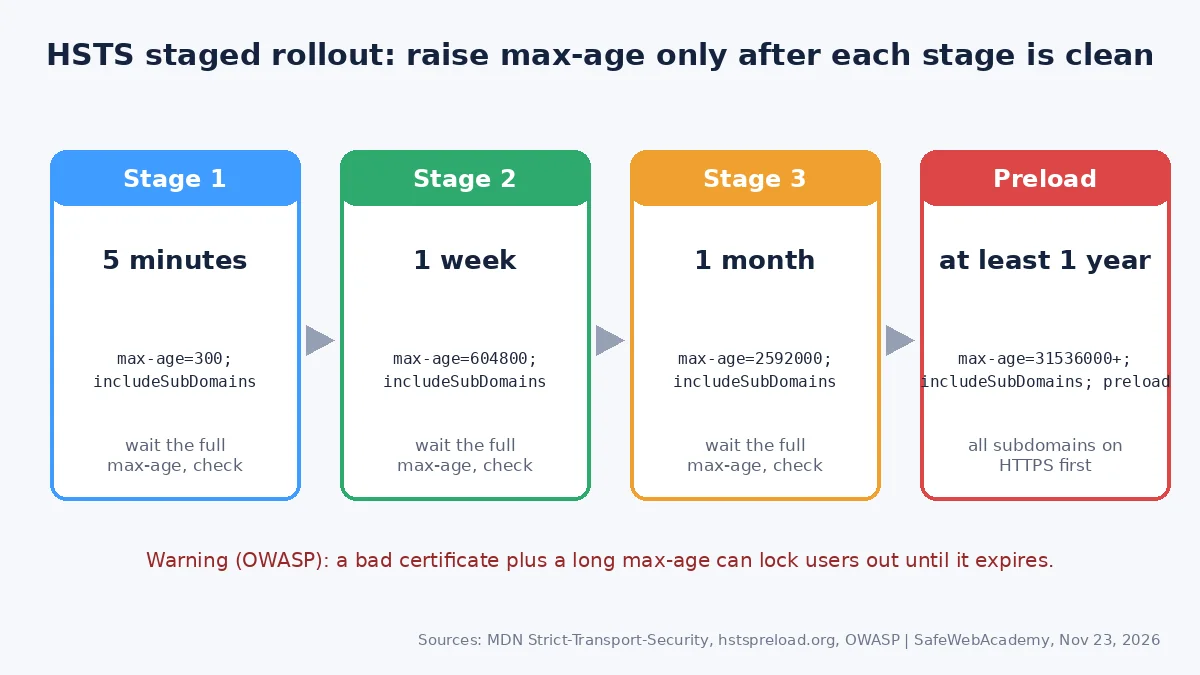
Preloading is hard to undo, and it covers all subdomains, so submit to hstspreload.org only when every subdomain serves HTTPS.
How Do You Build a Content Security Policy?
A Content Security Policy (CSP) lists which sources may load scripts and other content, so injected scripts are blocked. OWASP’s nonce-based strict policy is a good target:
Content-Security-Policy: script-src 'nonce-{RANDOM}' 'strict-dynamic'; object-src 'none'; base-uri 'none';The nonce must be a fresh random value for every response and must be added to your own <script> tags by a real templating engine. OWASP warns against a middleware that adds the nonce to all script tags, because injected scripts would get it too. Static HTML cannot use nonces; OWASP offers a hash-based variant for that case.
Start with Content-Security-Policy-Report-Only. MDN explains that this mode does not enforce the policy but reports violations, so you can fix inline code before you enforce. For framing, add frame-ancestors 'none' (or 'self') in the enforced CSP.
How Do You Add HTTP Security Headers in Nginx and Apache?
Use the web server’s header module and the always option so error pages get the headers too. Both examples use values from OWASP; replace the CSP with your tested policy.
Nginx
server {
    add_header Strict-Transport-Security "max-age=63072000; includeSubDomains; preload" always;
    add_header X-Content-Type-Options "nosniff" always;
    add_header Referrer-Policy "strict-origin-when-cross-origin" always;
    add_header Permissions-Policy "geolocation=(), camera=(), microphone=()" always;
    add_header Cross-Origin-Opener-Policy "same-origin" always;
}
The nginx documentation says add_header directives are inherited from the previous level if and only if the current level defines none. A single add_header inside a location block therefore drops all server-level headers for that location. Since nginx 1.29.3 the add_header_inherit directive (on, off or merge) can change this. Use merge only after checking your nginx version and testing.
Apache HTTP Server
<IfModule mod_headers.c>
    Header always set Strict-Transport-Security "max-age=63072000; includeSubDomains; preload"
    Header always set X-Content-Type-Options "nosniff"
    Header always set Referrer-Policy "strict-origin-when-cross-origin"
    Header always set Permissions-Policy "geolocation=(), camera=(), microphone=()"
</IfModule>
The Apache documentation says the always table adds headers even on errors and keeps them across internal redirects. If your application framework already sets some of these headers, avoid duplicates and set each header in one place.
How Can You Check Which HTTP Security Headers Your Site Sends?
Request only the headers with curl and read the response:
curl -sI https://example.com/ | grep -iE "strict-transport|content-security|x-content-type|referrer-policy|permissions-policy|cross-origin|x-frame"Replace example.com with your own domain. Check the home page, a login page and an error page, because a location block or an application can change the headers. The Mozilla Observatory, which OWASP lists for this purpose, scans a site and reports missing headers. Online tools usually test only the home page.
What Else Should You Harden?
- Remove version leaks. OWASP advises removing
X-Powered-Byand hiding or genericizingServer, though attackers have other ways to fingerprint a stack. - Set
Cache-Controlfor sensitive pages. OWASP recommendsno-storefor sensitive responses.no-cachedoes not stop caching; it only requires revalidation. Proxies and filters can change these headers, as theExpiresFilterbug in our Apache Tomcat security update article shows. - Remove obsolete headers. Drop
Public-Key-Pins. OWASP says it was removed from Chromium in 2018 and recommends relying on Certificate Transparency and CAA DNS records. - Patch the server. Headers reduce impact but do not fix bugs. See our nginx and Apache HTTP Server update guides.
- Add a WAF in front. It is a second layer, not a substitute.
FAQ
Do HTTP security headers stop XSS completely?
No. A strict CSP is the strongest header-based defense against XSS, but you still need output encoding and input validation. Treat headers as defense in depth.
Is X-XSS-Protection still needed?
No. OWASP recommends a CSP that disables inline JavaScript and says not to set X-XSS-Protection or to set it explicitly to 0. MDN warns it can create XSS holes in otherwise safe sites.
Should I still use X-Frame-Options?
Prefer CSP frame-ancestors, which OWASP says obsoletes it in supporting browsers. Keeping X-Frame-Options: DENY as well is harmless for pages that must never be framed.
Can HSTS break my site?
Yes, if HTTPS breaks or a subdomain lacks HTTPS while includeSubDomains is set. Start with a short max-age and increase it in stages, as described above.
Do I need these headers on API responses?
Mostly not all of them. OWASP notes CSP, COOP and related headers may be meaningless on JSON responses that browsers do not render. X-Content-Type-Options: nosniff, correct Content-Type and HSTS still make sense.
How often should I review my security headers?
Review them after every server, proxy or framework change. Browser support and recommendations change, so recheck the OWASP cheat sheet. Values here were verified on November 23, 2026.
Conclusion
HTTP security headers take an afternoon to add and cut the impact of common web attacks. Start with HSTS (staged), nosniff, a Referrer-Policy and Permissions-Policy, then move CSP from report-only to enforced. Test every change with curl and the Mozilla Observatory.
References
All links below were checked on November 23, 2026.
- OWASP HTTP Headers Cheat Sheet
- OWASP Content Security Policy Cheat Sheet
- MDN: Strict-Transport-Security
- MDN: Content Security Policy (CSP)
- MDN: X-XSS-Protection
- RFC 6797: HTTP Strict Transport Security
- HSTS Preload List submission requirements
- nginx documentation: ngx_http_headers_module
- Apache HTTP Server documentation: mod_headers
- MDN HTTP Observatory
Related Articles
- OWASP Top 10 Explained: A Practical Guide to Website Security
- Complete Guide to Web Application Firewall WAF
- Nginx Security Update: 1.30.7 and 1.31.9 Fix 10 CVEs
- Apache HTTP Server 2.4.71: Patch mod_http2 CVE-2026-119618
- How to Secure Your Ubuntu Server: A Beginner-Friendly Guide
Last Verified: November 23, 2026. Prepared by SafeWebAcademy from OWASP, MDN, IETF, nginx and Apache documentation linked above. Header recommendations can change; recheck the sources before deploying.
Leave a Reply